Reimagining itineraries as a browsing experience (built & shipped solo w/ AI)
Took an underperforming feature, reframed the problem, and shipped a new approach independently using AI.
Feature ready, In QA stage
Role
Product designer + Builder
Timeline
3-4 weeks
incl. Design and FE


Don't have enough time to read through the whole thing? Skim through it with TLDR version (AI version)
I would still reccomend reading the whole thing because that includes nuances, whys, hows and reasonings
Backstory
Headout sells experiences, not products.
For a user, the hardest question to answer before booking is:
What will this experience actually feel like?
We had already built itineraries to answer this.
But their impact was inconsistent.
Hop-on-hop-off tours: Showed strong engagement (rough 14% adoption) for itineraries in terms people discovering it directly as well as using the entry point of it's itinerary (called routes & schedule).
Day trips and tours: Adoption was abysmally low and no. of people discovering itineraries was significantly low.
Same placement. Same UI. Same entry point.
The only visible difference? Copy.
“Routes & schedule” vs “Itinerary” was driving a 3-4x+ difference in CTR.


Reframing the problem
The obvious direction was to improve the entry point.
But that only optimized clicks, not understanding.
Users still had to:
Click into a product
Scroll
Then figure out what they were buying
Which meant we were trying to solve the problem only from a surface level and future problems of deciphering the itineraries were just waiting to spring up on us.
I reframed the problem to:
Why does a user need to click at all to understand the experience?
View
Figure
Click
Understand
Decide
Before
After
Insights
Experiences across apps/websites and categories are evaluated visually by usage of media (images/videos)
You decide if you want to travel somewhere by looking at photos/videos.
You pick a restaurant for your night out by looking at photos and reviews.
You follow someone on your social media by looking at quality of content in their reels (short sequences of images/videos)
But our itineraries were doing the opposite — long text blocks, timelines, maps.
The feature meant to help users imagine the experience wasn’t helping them imagine anything.
The idea
Bring the itinerary into the browsing moment.
Not as a feature hidden behind a click, but as a visual story users can consume instantly.
SOLUTION
What does our end feature look like?
I replaced the product card gallery with a sequence of itinerary moments.
Each slide answers one question:
What will I see or experience?
Full-bleed image
Short, emotionally-driven copy
Ordered sequence (not a random gallery)
Users can swipe through the experience directly on the card.
Even without clicking, user will have a good understanding of what they will get in the experience.


START POINT
Central London
Stand before the ancient Stone Cirlces
Board your AC coach from the boarding point mentioned on your ticket voucher.
See the towering sarsen stones up close and take in the scale, symmetry, and quiet power of one of the world's most iconic prehistoric monuments.
Designing for behavior
A carousel alone doesn’t create engagement. Small interaction decisions made the difference:
Auto-swipe hint after inactivity to signal depth
Single-run CTA pulse to invite deeper exploration
No repeated motion to avoid fatigue
The goal was to make exploration feel obvious, not instructed.
Going deeper when needed
For users who wanted more detail:
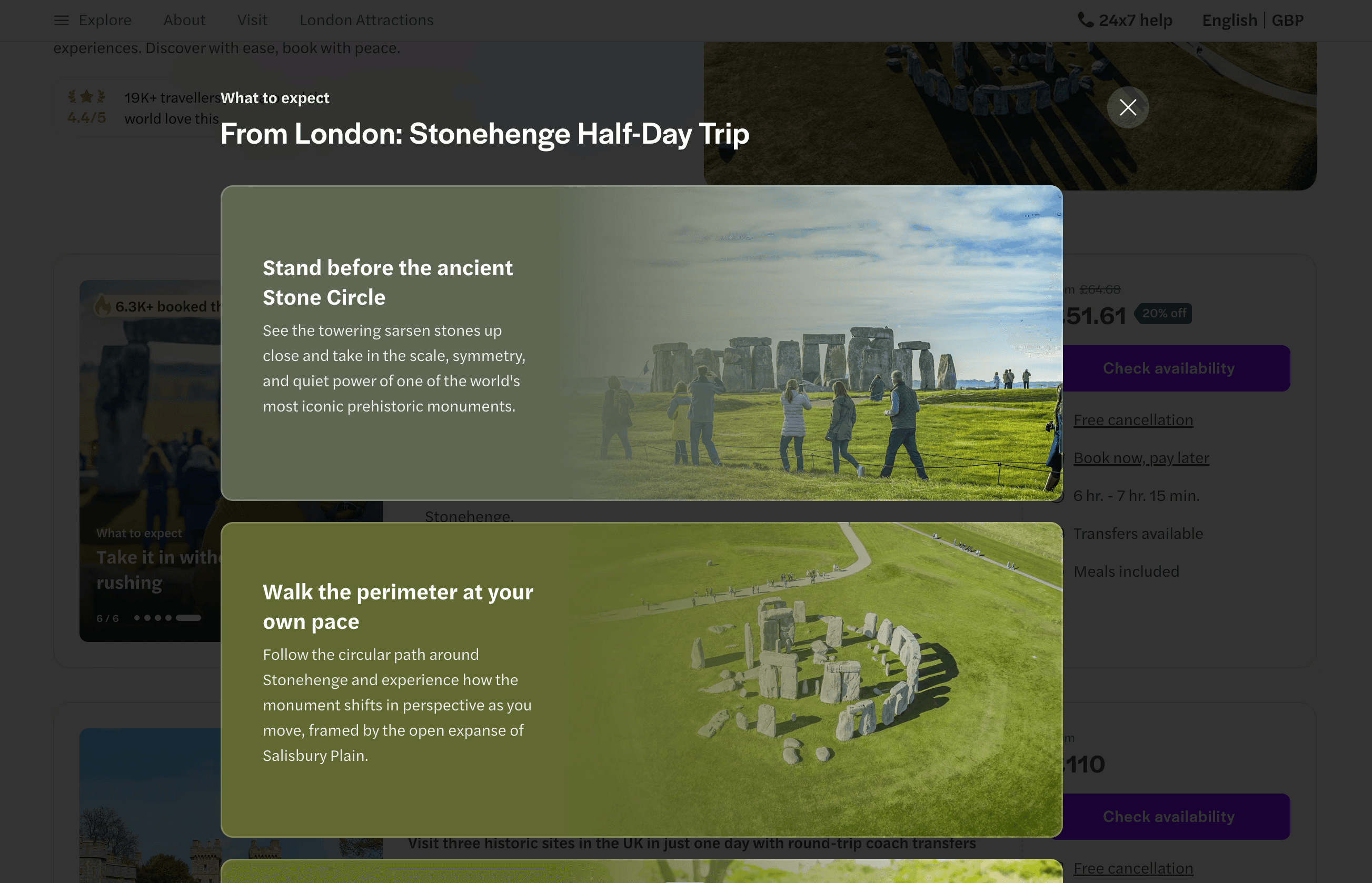
Tapping opens a full itinerary overlay
Same structure, richer content (image + title + description)
Adapted to context:
Mobile → immersive, one stop at a time
Desktop → scannable, multi-stop overview
We also extended this into PDP as a "What to expect" section to maintain continuity.
WORKFLOW
How I built this?
Instead of pitching and waiting for bandwidth, I decided to build the experiment myself.
I didn’t want to pitch this as a concept first. I wanted to see it working before asking others to believe in it.
This was the first time I went beyond small fixes and shipped a full feature using AI.
Workflow
Designed components and flows in Figma
Used Claude Code to translate designs into React components
Built components directly in our design system (Espeon)
Integrated into frontend (Kirby) behind a feature flag
WORKFLOW
What changed for me, as a product designer
The feedback loop collapsed into one.
Instead of:
Design → handoff → build → review
It became:
Design → build → observe → refine
This helped resolve decisions that are hard to spec:
Motion timing (what feels helpful vs distracting)
Designing in actual space where users would be interacting, not figma prototypes
Visual balance (how much variation feels intentional vs noisy)
NEW WAY
Engineering considerations
Even though this was AI-assisted, I treated it like production code — something others should be able to build on.
Key things I handled during build:
Component reusability: Built carousel and overlay as composable components in the design system
State handling: Synced card preview state with overlay entry points
Performance: Avoided heavy re-renders on swipe interactions
Accessibility: Ensured contrast compliance for image-based backgrounds
PR quality: Iterated through PR reviews to align with engineering standards
Early PRs had a lot of feedback. Over time, the quality improved significantly as I internalized patterns.
STAKEHOLDERS
The turning point in alignment
Once the feature was ready, I shared it with stakeholders.
It was fully built. The discussions were about does this approach make sense, not timeline or bandwith or quarter pipeline.
The main question became:
What do we need to take this live?
Answer: PR reviews, content generation and QA
No dependency on engineering bandwidth. This made it significantly easier to get buy-in for experimentation.
EXPERIMENTATION
Solving for content at experimentation stage
To run the experiment, we needed:
40–60 experiences
Structured stops
Relevant images per stop
Manual creation wasn’t feasible.
I partnered with a PM to build a pipeline that:
Pulled itinerary data via Headout APIs
Generated structured content
Mapped images automatically
This gave us a curated dataset ready for experimentation.
CURRENT STATUS
Where we at?
Feature ready, In QA stage
Feature built end-to-end
Experiment configured
Currently in QA (delayed due to parallel experiments)
LEARNINGS
What this project changed?
Ownership changes what gets built
When I didn’t depend on external bandwidth, I explored a direction that otherwise wouldn’t have been prioritised.
AI is leverage, not just speed
AI allowed me to:
Ship independently
Iterate faster
Reduce coordination overhead
Building improves product judgment
Working in code forced sharper thinking around:
Edge cases
System behavior
Performance tradeoffs
LEARNINGS
Reflection
Irrespective of experiment results, this project demonstrated something important:
Someone without a engineer title can take an idea from concept to production and run experiments independently.
That shift in ownership changes both the kind of problems I take on and how quickly I can validate them.
FUTURE
What's next?
If this works, move from curated &hardcoded content to API-driven scaling across all experiences
Work with backend engineers to figure out the APIs
Frontend is already at a level that it can be scaled right after the experiment
Experiment with type of content
Look for similar problem statements and solve for them end to end